










Toegankelijkheidsmenu openen Doorgaan naar pagina-inhoud

Win subscribers with a standout YouTube banner

Give your channel a header that looks right on phones, laptops, and TVs. Pick from 42,100+ YouTube channel art templates, drop in your logo, and download in minutes.

Win subscribers with a standout YouTube banner

Give your channel a header that looks right on phones, laptops, and TVs. Pick from 42,100+ YouTube channel art templates, drop in your logo, and download in minutes.
Win subscribers with a standout YouTube banner Win subscribers with a standout YouTube banner

Ontgrendel slimmere, AI-aangedreven marketing met PosterMyWall Premium.

Alles wat u nodig hebt om uw zaak te promoten

Make your youtube channel stand out

YouTube wants your banner at 2560 x 1440 pixels, and every screen shows a different slice of it. Keep your channel name and logo inside the centered 1546 x 423 safe area, and nothing important gets cropped on a phone. Every design in our YouTube channel art templates gallery is already built to that size, so you skip the guesswork.

Effortless customization for creators

No design experience? No problem. Our platform offers millions of stock images, videos, and audio to choose from. Instantly resize your designs for free, ensuring your YouTube channel art looks perfect on any device. Elevate your channel's visual appeal and engage your audience with professional results, all without the hassle.

Start with a prompt or a template

Describe your channel and Create with AI builds the banner for you. Or pick a ready YouTube banner template and swap in your text. Both paths open the same editor, where you can generate a background with AI Images, drop in your own photos, and change fonts and colors until it feels like your channel.

Keep your whole channel looking like you

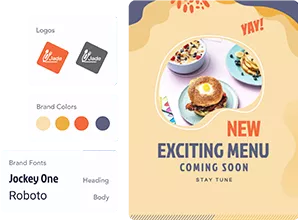
A banner works hardest when your thumbnails, posts, and profile all match it. Save your logo, colors, and fonts in Brand Kits and apply them in two clicks. Then resize the same artwork into YouTube thumbnail templates and social posts, and schedule them to YouTube without leaving the app. One look, everywhere your channel shows up.

Waarom PosterMyWall gebruiken

How to make YouTube channel art

  1. Ga GRATIS aan de slag

    Open PosterMyWall op uw desktop, mobiel of tablet om gratis aan de slag te gaan.

  2. Kies een ontwerpsjabloon

    Kies uit duizenden professioneel ontworpen sjablonen voor elk bedrijf, evenement of gelegenheid.

  3. Personaliseer uw sjabloon met eenvoudige tools

    Voeg uw logo, afbeeldingen, video's, lettertypen, stickers, audioclips en meer. Gebruik merksets voor merkconsistente ontwerpen.

  4. Download uw ontwerp

    Download for free or purchase high-res files. Upgrade to PosterMyWall Premium plans for unlimited high quality image and video downloads, plus the full AI suite.

  5. Deel overal en altijd

    Publiceer op Facebook, X (Twitter), Instagram of verstuur via e-mailcampagnes, sluit in op websites of geef weer op digitale schermen.

Alles-in-één, AI-aangedreven marketingplatform

Maken, delen en bijhouden op één plek

Eenvoudige marketing begint hier

Eenvoudige socialemediamarketing

  • Creëer trendy socialemediavideo's met tijdlijn en AI-ondertitels en deel ze!
  • Maak snel bijschriften met onze AI-schrijver, geen schrijversblok meer.
  • Publiceer berichten en verhalen op alle sociale media met één klik. Uw bereik was nog nooit zo groot!
  • Plan berichten van tevoren voor al uw sociale media. Stel gewoon in en vergeet.
  • Maak video's met tijdlijn en AI-ondertitels.
  • Maak snel bijschriften met onze AI-schrijver, geen schrijversblok meer.
  • Publiceer berichten en verhalen op alle sociale media met één klik.
  • Plan berichten van tevoren voor al uw sociale media. Stel in en vergeet.
Eenvoudige marketing begint hier

E-mails zonder code gebruikers zonder code

  • Kies uit meer dan 3.600 professioneel ontworpen e-mailsjablonen.
  • Pas aan met sectiesjablonen, stijlen, samenvoegtags en meer.
  • Verstuur tot 10.000 e-mails per maand.
  • Maak e-mailaanmeldformulieren om uw lijsten te laten groeien.
  • Kies uit meer dan 3.600 professioneel ontworpen e-mailsjablonen.
  • Pas aan met sectiesjablonen, stijlen, samenvoegtags en meer.
  • Verstuur tot 10.000 e-mails per maand.
  • Maak e-mailaanmeldformulieren om uw lijsten te laten groeien.
Eenvoudige marketing begint hier

Ontwerp met eenvoudige tools

  • Ontgrendel onbeperkte downloads van afbeeldingen en video's met hoge resolutie
  • Maak verleidelijke productfoto's met AI-achtergrondverwijderaar.
  • Zet uw verbeelding om in werkelijkheid met AI-afbeeldingen.
  • Bereik snel consistente huisstijl met merksets.
  • Ontgrendel onbeperkte downloads van afbeeldingen en video's met hoge resolutie.
  • Maak verleidelijke productfoto's met AI-achtergrondverwijderaar.
  • Zet uw verbeelding om in werkelijkheid met AI-afbeeldingen.
  • Bereik snel consistente huisstijl met merksets en aangepaste lettertypen.
Eenvoudige marketing begint hier

Stroomlijn uw marketingplanning

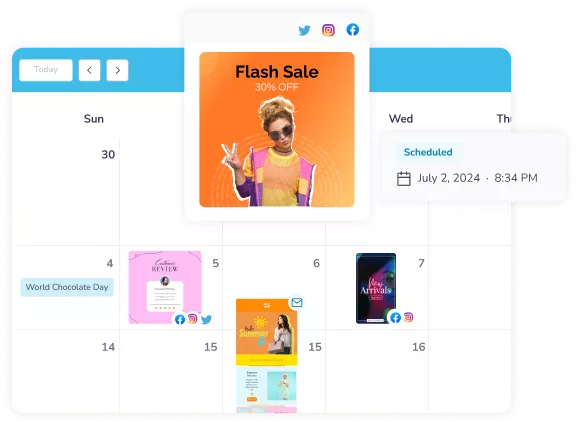
  • Plan socialemediaberichten en e-mails voor later.
  • Plan campagnes in één kalender en blijf op schema.
  • Mis nooit meer een marketingkans.
  • Plan berichten en e-mails voor later.
  • Plan campagnes in één kalender en blijf op schema.
  • Mis nooit meer een marketingkans.
Eenvoudige marketing begint hier

Creëer buzz voor uw volgende evenement

  • Trek publiek aan met onbeperkte aangepaste evenementpagina's.
  • Stel spannende evenementbeschrijvingen op met AI-schrijver.
  • Publiceer uw evenement direct op alle sociale media.
  • Hype uw evenement op met kant-en-klare e-mails.
  • Trek publiek aan met onbeperkte aangepaste evenementpagina's.
  • Stel spannende evenementbeschrijvingen op met AI-schrijver.
  • Publiceer uw evenement direct op alle sociale media.
  • Hype uw evenement op met kant-en-klare e-mails.
Eenvoudige marketing begint hier

Slimmere marketing met AI

Ontdek meer ontwerpsjablonen

Veelgestelde vragen

What size should a YouTube banner be?

The recommended YouTube banner size is 2560 x 1440 pixels, saved as a JPG or PNG under 6MB. YouTube accepts a minimum of 2048 x 1152 pixels, but the larger file stays sharp on TV screens. Every channel art template on PosterMyWall is already set to 2560 x 1440.

What is the YouTube channel art safe area?

The YouTube channel art safe area is the centered 1546 x 423 pixel strip that shows on every device. Keep your channel name, logo, and tagline inside it, and treat the space around it as background. PosterMyWall templates place the key text inside that strip for you.

Why does my YouTube banner look cropped on mobile?

Your banner looks cropped on mobile because YouTube shows only the middle slice of your 2560 x 1440 image on small screens. Text near the top, bottom, or outer edges disappears. Move everything you need people to read into the centered 1546 x 423 safe area and it will show up everywhere.

Can I make a free YouTube banner?

Yes, you can make a free YouTube banner on PosterMyWall. Open a channel art template, customize the text, colors, and photos, then download it at no cost. A free account covers the editor and the template library. PosterMyWall Premium plans add unlimited high-resolution downloads and the full AI suite.

What is the difference between YouTube channel art and a YouTube banner?

YouTube channel art and a YouTube banner are two names for the same image, the wide graphic across the top of your channel page. Some people call it a channel header or cover photo instead. All of them use the same 2560 x 1440 pixel size and the same safe area.

How do I upload a banner to my YouTube channel?

To add your banner, open YouTube Studio, go to Customization, then Branding, and upload your image under Banner image. YouTube shows a preview across TV, desktop, and mobile before you publish. Download your finished design from PosterMyWall as a JPG or PNG and upload it there.

Can AI make a YouTube banner background?

Yes, describe the look you want and PosterMyWall AI builds a banner background for you, ready to edit. You can also generate a custom image with AI Images and place it behind your channel name. Both options open in the same editor as the ready-made templates.

Are there gaming YouTube banner templates?

Yes, PosterMyWall has gaming YouTube banner templates alongside vlog, music, fitness, beauty, cooking, and travel designs. Search the channel art gallery by your topic, then change the colors and fonts to match your channel. You can also drop in your own screenshots and logo.

Can I make a YouTube banner on my phone?

Yes, PosterMyWall works in any browser and in the free iOS and Android apps, so you can design a banner on your phone or tablet. Your work syncs across devices, which means you can start a design on your laptop and finish it on your phone.

How often should I update my channel banner?

Refresh your channel banner every few months, or whenever your content focus, upload schedule, or branding changes. Seasonal promotions and new series are good reasons too. Duplicate your existing design in PosterMyWall, change the artwork and text, then upload the new version in a couple of minutes.

Vergelijk PosterMyWall






